CUSTOM SHADERS PATCH • COCKPIT-CAMERA MOD
TURN YOUR HEAD.
THE COCKPIT FOLLOWS.
Phone-based 3-DOF head tracking with lean detection for Assetto Corsa. No headset. No IR clip. Just your phone watching you drive.
HOW IT WORKS
FEATURES
THE APPS
PHONE APP FREE
Landscape HUD: camera feed and yaw ring on the left, connection and telemetry on the right.
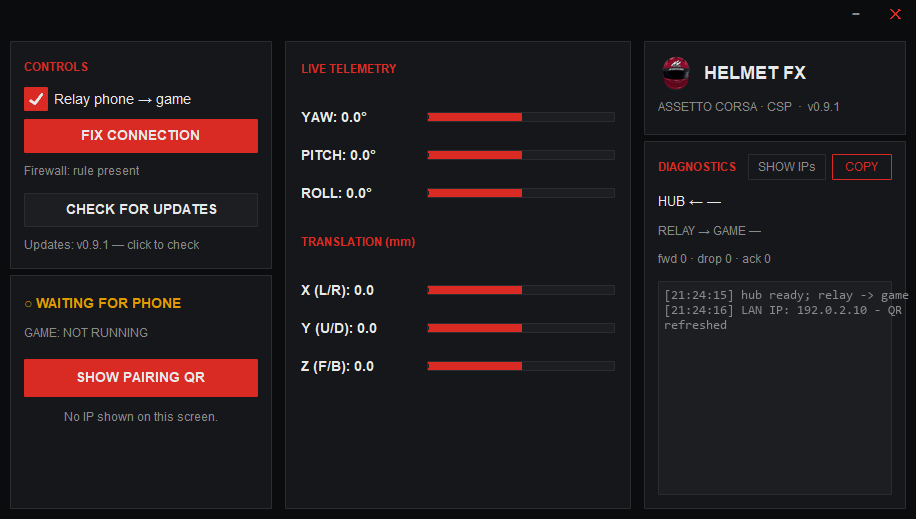
PC HUB FREE
Pairs, relays, fixes the firewall in one click, then lives in the system tray. Sign in once; it remembers you.
SETUP SIX STEPS · TEN MINUTES
- GET THE MODBuy it once ($10), then download
HelmetFXMod.zipfrom your account. Extract into the Assetto Corsa root soextension/lua/cockpit-camera/HelmetFX/exists. - ENABLE IN CSPContent Manager → Settings → CSP → NeckFX → tick Replace old implementation → choose Helmet FX.
- RUN THE HUBSign in (
ACCOUNT), pressFIX CONNECTIONonce for the firewall. Closing it keeps it in the tray. - SAME WIFIPhone and PC on one network. That's the whole requirement.
- CONNECTPhone →
SCAN QR(orFIND PC) →START TRACKING. - CALIBRATELook straight ahead →
CALIBRATE→ get on track.
Tuning (sensitivity, smoothing, limits) lives in CSP settings next to the script entry — not on the phone.
GUIDE SYMPTOM → FIX
MOUNTING YOUR PHONEEye height, facing you, and it must not shift.
Front camera pointed at your face, roughly eye height, close enough that a head turn is still clearly inside frame. A vent or windshield mount both work — what matters is the phone doesn't move once mounted.
VIEW LOOKS "OFF" FROM THE STARTStale calibration. Re-run CALIBRATE.
Sit in your normal driving position, look straight ahead, tap CALIBRATE. Always re-run it after moving the mount, changing seats, or reinstalling the app — a stale calibration, not a tracking bug, is the #1 cause.
TUNING YOUR FEELIt's all in the CSP panel; applies instantly.
Content Manager → Settings → Custom Shaders Patch → NeckFX → Helmet FX. Sensitivity, smoothing, deadzone, limits and per-axis invert all live there, apply instantly, and persist between sessions. No phone-side settings to fight with.
JITTERY OR SHAKY VIEWRaise SMOOTHING one step at a time.
The filter trades a little responsiveness for stability as you raise it, but stays alert to real head turns — you shouldn't need to push it past the low-to-mid range for a normal mount.
AN AXIS MOVES THE WRONG WAYFlip that axis's INVERT box.
If yaw, pitch, roll or lean move opposite to your head, tick that axis's INVERT checkbox in the Helmet FX panel — no reinstall, no code, applies immediately.
PHONE CAN'T FIND THE PCSame WiFi, then FIX CONNECTION, then rescan.
Both devices need the same WiFi network. On the PC, hit FIX CONNECTION in the hub to (re)open the firewall rule, then try SCAN QR again — or use FIND PC for auto-discovery if the QR camera won't focus.
Still stuck? The hub's DIAGNOSTICS panel (and its COPY button) has exact forward/drop/ack counts and the last error — send that along if you ask for help.
BUY ONE-TIME • NO SUBSCRIPTION
HELMET FX FOR ASSETTO CORSA
$10one-time
- CSP cockpit-camera mod — the part you're buying
- PC hub for Windows — free
- Phone tracking app — free
- All updates to the mod included
- One account · one PC relaying at a time · lend it like a game disc
Taxes calculated at checkout by Stripe, our merchant of record. Card, Apple Pay, Google Pay, Link.
WHAT HAPPENS WHEN YOU BUY
ONE SEAT, SHARED LIKE A DISC
Your account relays on one PC at a time. A friend can play when you're not; you take the seat back from the hub whenever you want it. Not for you? Ask for a refund — no forms.
DOWNLOAD
CSP MOD
v0.9.1 — HelmetFXMod.zip
$10 one-time. Buy once, download here any time.
PC HUB
Windows — HelmetFX-PC-Hub.zip
Free, no install. Relays head tracking for accounts that own the mod.
AVAILABLE SOONANDROID APP
Companion tracker
Free on Google Play. The tracking itself unlocks with the mod.
GOOGLE PLAY — SOONRequires Assetto Corsa + Custom Shaders Patch 0.1.80 or newer, an Android phone, and both devices on the same WiFi.
ACCOUNT
Signed in as
PAYMENT RECEIVED
Unlocking your account…
HELMET FX FOR ASSETTO CORSA
NOT PURCHASED
This account hasn't bought the mod yet. Sign-in works everywhere, but the PC hub keeps the relay locked until it does.
YOUR DOWNLOADS
On the PC: open the hub → ACCOUNT → sign in with . Start the phone app and tracking unlocks by itself. One PC relays at a time; the hub tells you if the seat is taken and lets you take it back.
TELEMETRY+ PAID ADDON — COMING
Live RPM, speed, gear and G-force from the sim, straight onto your phone mount. Same phone, same hub, same account — it just switches on.